
Hi EVeryone,
Welcome to the second edition of the Pionix Cloud Changelog. It has been a while, so this one covers everything since the public beta in July: Pionix Cloud v1.13 to v1.15 and Cloud Connector v0.2 to v0.5.
The theme this time is organising and sharing your fleet. You can label everything you manage, share a single charger with another company, build your own dashboards, and restart a single service on a charger. The Cloud Connector mostly got polish and hardening in the meantime; there is a short section on that further down.
A few changes need action on your side, most of them in the Cloud Connector. They are at the bottom under "Action required". Read them before you update.
TL;DR
- Labels: tag chargers, editions, channels, parks and sessions, filter by them, and let rules apply them automatically.
- Sharing across companies: give another company or person access to a single charger, park, edition or channel, with exactly the permissions you choose.
- Custom dashboards on the Health tab, including SVG overlays and 3D models of your charger.
- Restart, stop or enable a single systemd service on a charger from the Debugging tab. Needs Cloud Connector v0.4.0.
- Telemetry monitors: rate caps, heartbeats and deadbands per value, plus temporary high-frequency overrides for debugging.
- Cloud Connector v0.3 to v0.5 reconnect faster on network changes, use a fraction of the memory, and run sandboxed.
- Action required if you skipped v0.2 (CLI subcommands,
--format json) and for v0.4 (allowlists, local broker and MQTT bridge config). Details at the bottom.
What’s new in the cloud
Labels: your own tags for the whole fleet
Labels are tags private to your company. You attach them to chargers, firmware editions, release channels, charging parks and charging sessions, and every one of those lists gets a label filter. On the charger list the filter is part of the URL, so you can send a filtered view to a colleague as a link.
Keys make label values mutually exclusive: with priority::high and priority::low, a charger is always exactly one priority. Rules let a label look after itself. You define conditions over the entity’s fields, and every matching entity gets the label and loses it again when it stops matching. Rules are rolling out gradually, so if you do not see the rule editor yet, it is on its way.
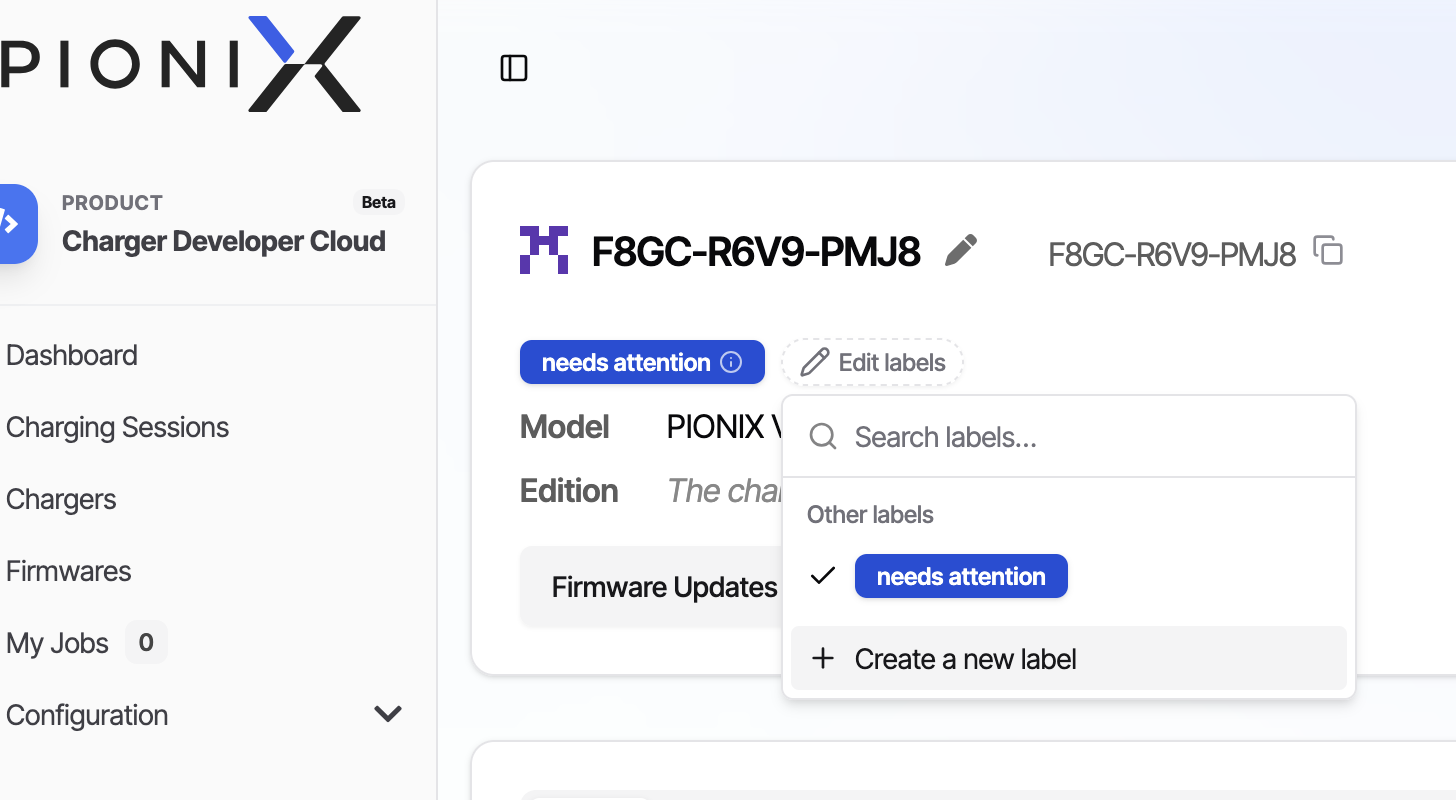
You find all of this under Label management in the sidebar. Docs: Organise Your Fleet with Labels.
Share a charger with another company
You can now give another company, or a single person, access to one charger, charging park, firmware edition, release channel or Cloud Connector config. The entity stays yours and the recipient does not join your company. Pick a role (Viewer, Operator, Editor) or hand-pick permissions. Shares expire after a week unless you say otherwise, and "Who has access" lists every recipient and lets you revoke.
To share with a whole company you need their shareable ID, which each company finds in its own share dialog. You can also share a label instead of a single entity, and the recipient sees whatever carries that label.
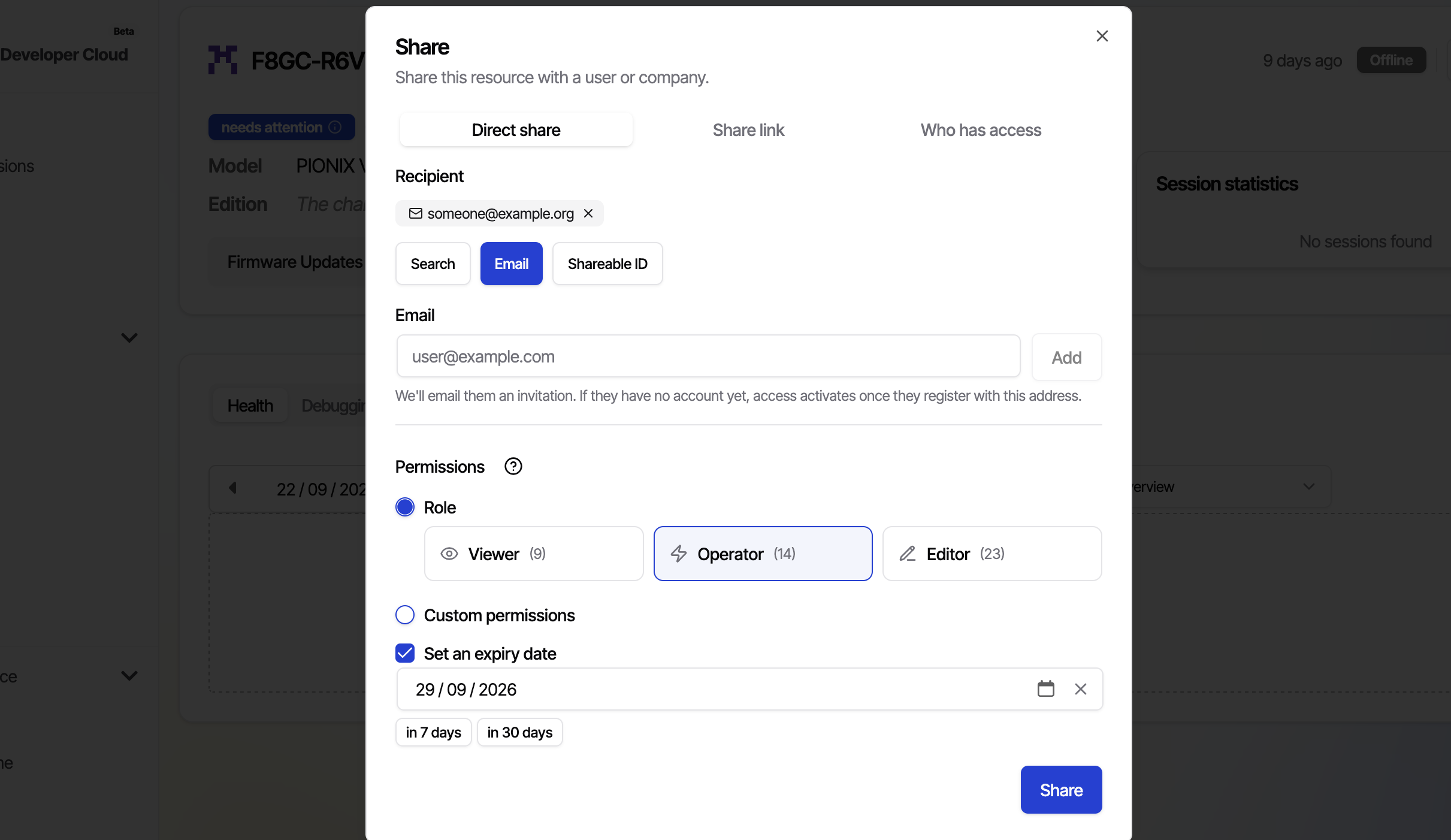
Dashboards: build your own view of a charger’s health
The Health tab no longer stops at the auto-generated telemetry list. Pick the values you care about, lay them out on a grid, and save. A dashboard can be assigned to a manufacturer and model, optionally scoped to a firmware range, so every matching charger gets it automatically.
There are more widgets than before. A multi-series chart puts L1, L2 and L3 into one picture. State badges and timelines show categorical values and when they changed. Stat tiles show the latest number with a sparkline, and you can drop in your own Markdown notes. Two widgets go beyond charts: an SVG overlay, where you upload a schematic of your charger and bind live values to hotspots, and a 3D model widget that takes a .glb.
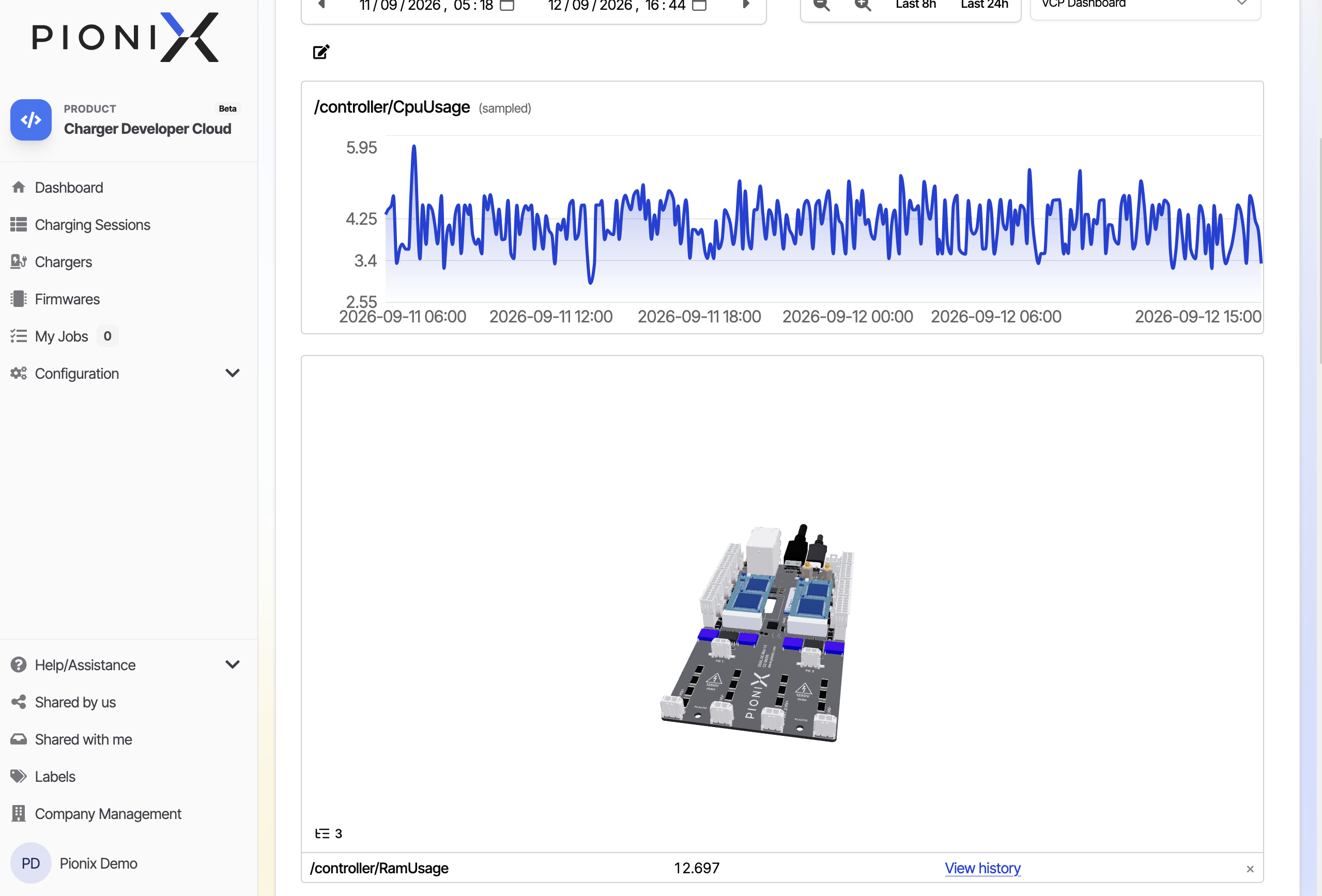
Docs: Save and Share Telemetry Dashboards, including a Blender walkthrough for preparing a .glb.
Restart a single service on the charger
Until now the remedy for a wedged service was a full reboot or an SSH session. The services table on the Debugging tab now lists every systemd unit and lets you restart, start, stop, reload, enable or disable it. While a charging session is running, disruptive actions are refused unless you force them.
Needs Cloud Connector v0.4.0 on the device. On older devices the actions stay greyed out.
Telemetry monitors: decide what your chargers report
Every telemetry value can carry a reporting policy: a rate cap, a heartbeat, and a deadband so you only hear about changes that matter. You set the baseline in the charger’s config, and the cloud shows the policy currently in force. For debugging, apply a temporary override from the UI to crank a value up to high frequency. Overrides disappear on reboot, so you cannot leave a charger shouting forever.
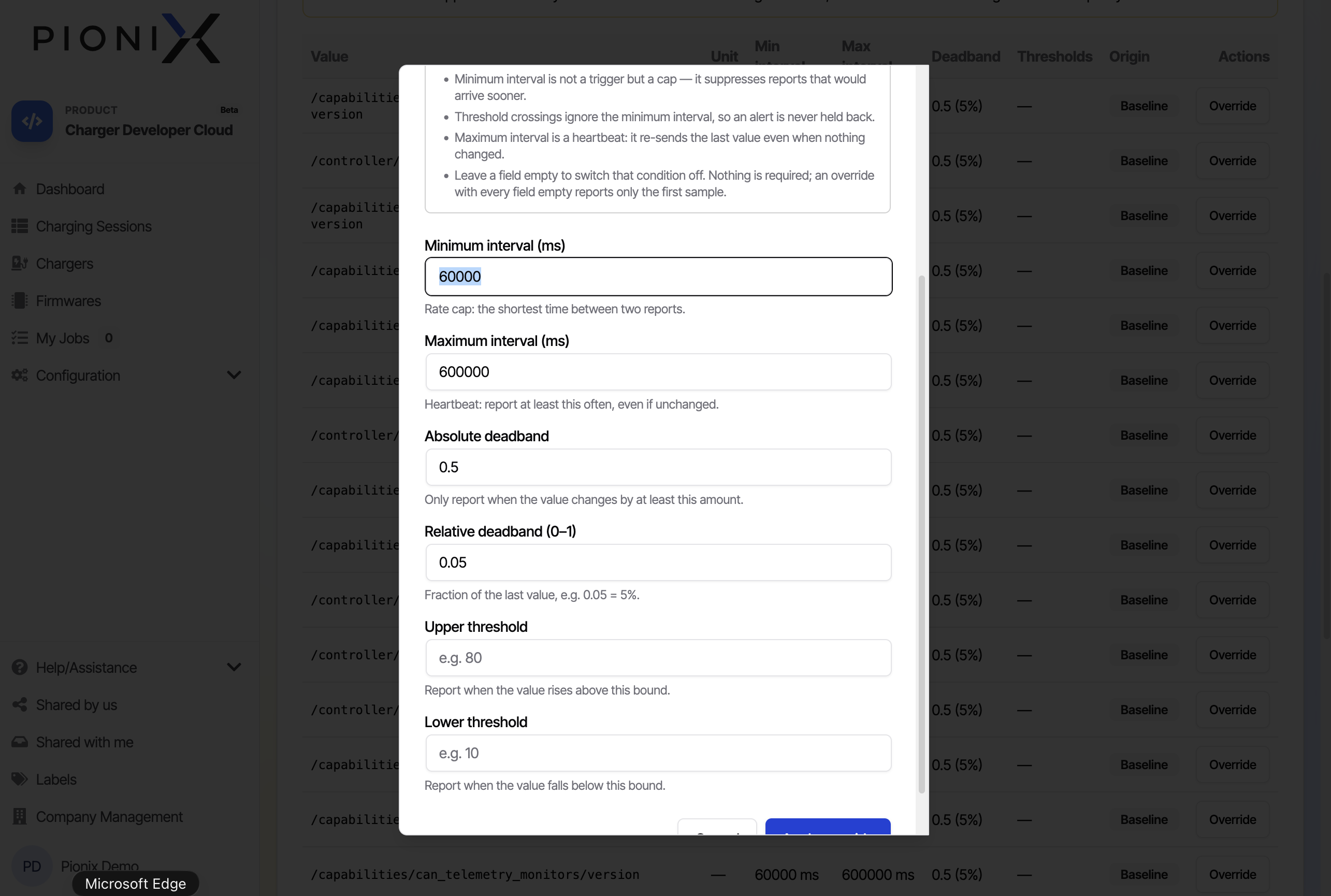
Smaller things worth knowing
- Lists are real tables now. Sort, filter, hide columns, and share the view as a link.
- Production View has production-line statistics: cycle-time distribution, a Pareto chart of failing test phases, and per-device yield across retests.
pc-cli enrollment create-otpcreates an enrollment code with your API key and prints the quick-install command, so a pipeline can provision chargers without the web UI. Docs: CI/CD Integration.- In the MQTT Explorer, click any value on the EVerest message bus and it becomes telemetry: charted, monitored and available on dashboards. New this time is a "Subscribe to all" button. Docs: Inspect EVerest Messages.
- Owners get an email when someone joins their company.
- Virtual charger parks run with two vCPUs now, and the shipped example configs have Node-RED enabled.
Fixes you may have noticed
- A charger could get stuck showing "Offline" while its telemetry kept streaming, which also blocked remote access.
- One malformed message could stop telemetry storage for a charger until we restarted the backend.
- Values captured via the MQTT Explorer now show up on the Health tab without a reload.
- Widget order no longer drifts when you save a dashboard.
- Cmd/Ctrl-click on the view switcher opens the view in a new tab.
Cloud Connector: hardening and polishing
Cloud Connector v0.3 to v0.5 are mostly about making the connector leaner and sturdier on real hardware.
- Faster reconnects when the network changes (v0.3.1). The connector watches the default route and interface carrier and redials as soon as the uplink changes, rather than waiting for its backoff or the MQTT keepalive to run out.
- Much smaller memory footprint (v0.4.0). On a 256 MB device the service went from roughly 157 MiB to 34 MiB, with no config change.
- Sandboxed service (v0.4.0). The systemd unit from our Yocto layer runs the connector with a read-only filesystem, no capabilities and a memory ceiling. Writable paths are derived from your
cloud-connector.yaml, so a standard config needs no changes. Remote SSH sessions run inside the same sandbox, so there is nosudoand no/home. - MQTT 5 to the local EVerest broker (v0.3.0). An oversized EVerest publish no longer takes down the connection and all telemetry with it.
- Remote SSH hardening (v0.4.0). Revoked relay keys are honoured, session TTLs are enforced, and a full session registry evicts the oldest session rather than locking you out.
- Updaters accept only http(s) bundle URLs, and EVerest config writes are atomic and survive a power cut.
- CLI help lists every command, with privileged ones marked.
meta-pionix-cloudcarries avX.Y.Ztag and a GitHub release per connector release, so you can pin a version.- Correct OTA results on devices that boot by slot name (v0.5.0). On grub targets using
rauc.slot=B, a successful update was reported as "rebooted into fallback slot" and the firmware version stayed unknown in the cloud. - Ubuntu Core support (v0.5.0). The connector now ships as a strictly confined snap, together with a new snapd plugin that reports your snaps’ services on the Debugging tab, uploads their logs, and handles EVerest restarts and reboots from the cloud.
Action required
Cloud Connector v0.1.x or older? Start here
- The CLI uses subcommands. The daemon starts via
cloud-connector daemon start --config …instead ofcloud-connector --config …. Our Yocto layer and systemd unit are already updated; check your own units and scripts. - CLI output is human readable by default. Scripts that parse
statusorget-configneed--format json.
Cloud Connector v0.2.x or v0.3.x? Start here
- Set your allowlists explicitly.
log_units(systemd plugin) andallowed_topic_prefixes(MQTT bridge plugin) treated an empty list as "everything". v0.4.0 warns about that, and the next major release will refuse everything instead. Name what may leave the device, or write the wildcard (["*"]and["#"]) on purpose. - Plaintext to a non-loopback local broker will be refused in the next major. Move the broker to a Unix socket or loopback, or set
allow_remote_plaintext: truein theeverest.mqttandmqtt_bridgeblocks. - Default local packet size is 1 MiB (was 5 MiB). Raise
everest.mqtt.max_packet_size_bytesif your local bus carries larger packets. The log names the key when it rejects one. - The MQTT bridge plugin refuses a config it cannot parse rather than silently running on defaults. A typo now stops the plugin, so check your bridge config before updating.
- Network failover needs
net.ipv4.conf.*.ignore_routes_with_linkdown=1, otherwise the redial goes out the dead interface. - Remote SSH: session TTLs are capped at 24 hours, and OpenSSH certificates, FIDO and
ssh-dsskeys are refused. Use ed25519, ECDSA or RSA. - Config schema tightened.
tls.client_credentialsis now required, which the daemon always demanded anyway. Configs generated by the cloud wizard before Cloud v1.14 may lack it. If your daemon does not start after the update, regenerate the config.
Any Cloud Connector version: Pionix Cloud side
- Operator and Editor share roles now include service control. Grants you issued earlier are unchanged; new grants of the same role are broader.
meta-basecampis no longer a supported Yocto base. The integration guide namesmeta-everestonly.
As always: if something in here is unclear, or a change bites you in a way we did not anticipate, just reply to the changelog email. It reaches the team directly.
Cheers, Your Pionix Cloud Team