
Hi EVeryone,
Pionix Cloud v1.16 and Cloud Connector v0.5.1 are out. The headline: the session dialog now decodes ISO 15118 and DIN 70121 traffic right in your browser, so finding out why a car and a charger did not agree no longer needs Wireshark.
If you created virtual charger parks from the Dual-port AC + DC template, or forward your whole local MQTT bus to the cloud, check "Action required" at the bottom.
TL;DR
- New Logs tab in the session dialog: an explorer for ISO 15118-2, ISO 15118-20 and DIN 70121 sessions with a timeline, the full message sequence, a message inspector and automatic checks.
- Telemetry monitor overrides show a live preview of what the charger will report, and intervals can be entered in seconds, minutes or hours.
- Labels: share a label straight from its detail page.
- Session search finds sessions by session ID and charger name, regardless of case.
- Cloud Connector v0.5.1: more reliable reconnects after a rare MQTT error, and telemetry values held back by a rate cap are sent later instead of skipped.
- Action required: parks from the Dual-port AC + DC virtual charger template need a config fix, and v0.5.1 blocks root MQTT wildcards unless you allow them explicitly.
What’s new in the cloud
Look inside a charging session
The Files tab in the session dialog is now a Logs tab. As before, you request the event log and the Ethernet capture from the charger at the top of the tab. Once they are uploaded, the tab decodes them in your browser and opens an explorer:
- A summary with a verdict, the protocol (SupportedAppProtocol, DIN 70121, ISO 15118-2 or ISO 15118-20), energy and stop reason.
- A timeline with charger state, CP signal, link and V2G lanes. Drag to zoom into the moment something went wrong.
- The full message sequence, with requests paired to responses and charge loops folded. Search it by name, field value or latency, for example
name=PreChargeReqorlatency>100. - An inspector that shows every message decoded, what changed since the previous message of the same type, and the raw bytes.
- Checks for what usually breaks interoperability: failed response codes, EV and EVSE error codes, unanswered requests, a missing SessionStop, and the protocol timers (message timeouts, CableCheck, PreCharge).
If the V2G traffic is TLS-encrypted, the explorer rebuilds the sequence and timing from the event log instead. Sessions without high-level communication get a summary and timeline from the event log alone.
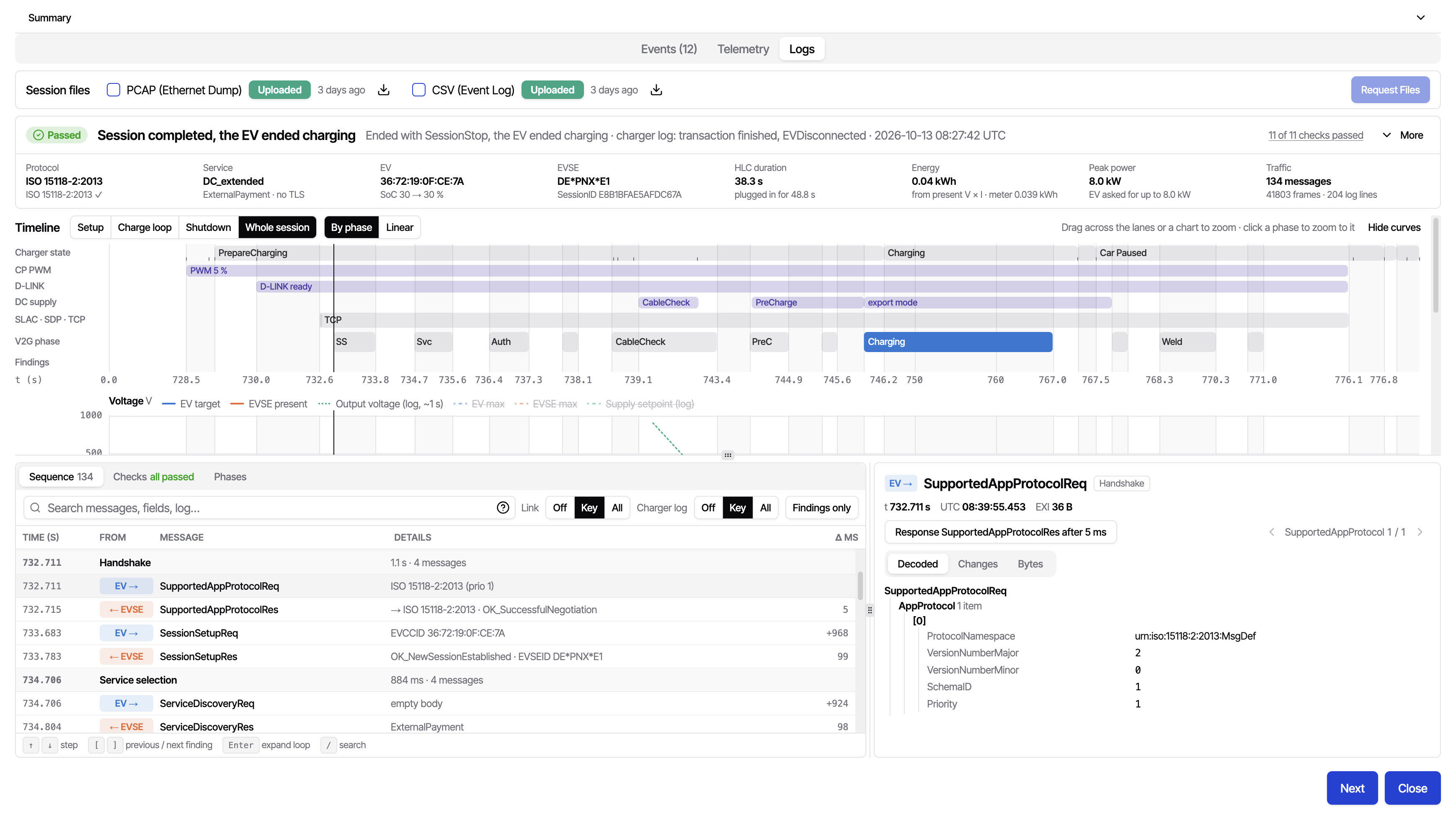
No hardware at hand? The new virtual charger park template EVerest without OCPP (DC with ISO 15118 capture) records a full ISO 15118 session for you to explore. Docs: Virtual Charger Park.
Preview a monitor before you apply it
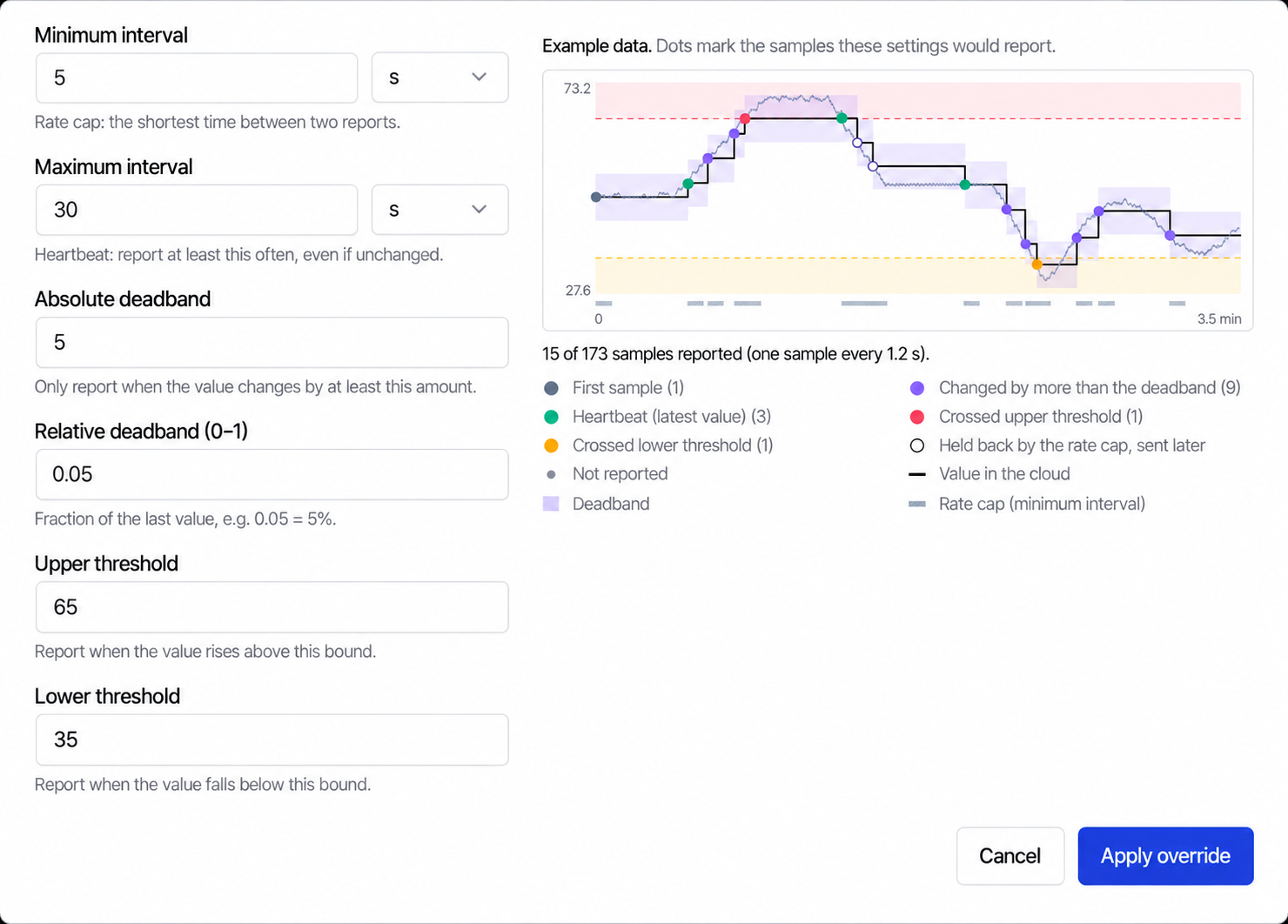
The override dialog for telemetry monitors now draws what the charger would report on example data, with your deadband, thresholds, rate cap and heartbeat marked, so you can tune a policy before you send it. Intervals take units (ms, s, min, h), and a deadband in an override now takes effect as you would expect.
Labels
- Share a label from its detail page, without going back to the list.
- Labels you create from a charging park, session, edition or channel get that type as their scope automatically.
- Label chips on light colours use dark text, so they stay readable.
- The "Currently carried by" count updates live and only counts entities you can still see.
Smaller things worth knowing
- Session search matches the session ID, the charger’s common name and its custom name, regardless of case. Chargers without a custom name show their common name in session lists instead of an ID.
- Charger detail pages have a back button that takes you back to where you came from, with your search kept.
- The station filter in Test Reports is a searchable list instead of an ID field.
- Profile settings link to your sign-in account, where you can link or unlink an identity provider. That account page now has the same look as Pionix Cloud.
- Navigating between pages is noticeably faster.
- The session search is kept in the address bar, so you can bookmark or share a filtered list.
- Dashboard widgets check the file size of SVG and 3D model uploads before uploading.
Fixes you may have noticed
- A monitor override with an interval outside the supported range was only rejected after Apply, with a generic error. It is now flagged in the dialog before you send it.
- Deleting an MQTT telemetry mapping that is part of the charger’s configuration seemed to work, but the mapping came back. You now get an error that explains it cannot be removed live.
- Sessions that ended because nobody plugged in in time showed as "In progress" forever. They now show as Failed, with the correct duration.
- Removing a file from a virtual charger park and adding it again under the same name failed.
- The "EVerest OCPP 1.6 (Dual-port: AC + DC with ISO 15118)" template had a broken module layout (see Action required).
- Virtual charger parks could show healthy instances as "Missing".
- Test reports with very long fields could fail to import.
- Opening the Terms of Service or Privacy Policy with an expired login sent you to the login page or showed an error.
- Clearing a charger’s custom name left its name blank in session lists and elsewhere. It now falls back to the common name.
- A dashboard saved without "Show on chargers of this model" could not be opened again. It now stays on the charger you saved it from.
- Out-of-range numbers in cloud connector config fields are flagged before you save.
- When a new member joined a company with several owners, each owner got several copies of the notification. Each owner now gets one email, addressed only to them.
- A rejected dashboard widget upload now clears right away, without losing your other unsaved edits.
- Long charger names no longer push the buttons off the recently viewed charger cards.
Cloud Connector v0.5.1
A bug-fix release, mostly hardening found while testing the upcoming v0.6.0. We recommend updating, especially for the first two points.
- More reliable reconnects. In a rare case, when the connection dropped while a message was still waiting for the broker’s acknowledgement, the connector kept reconnecting without finishing its session. The charger kept working, but showed as offline in the cloud until the connector was restarted. It now recovers on its own.
- Rate-capped telemetry is sent later, not skipped. A value that changed within a monitor’s rate cap was skipped, and the next heartbeat repeated the last value sent. For values that change in quick succession, such as a service restarting, the cloud could show the earlier state until the next change. Such values are now sent as soon as the rate cap allows, and a heartbeat carries the newest sample. The new monitor preview shows exactly this behaviour.
- EVerest starting after the connector now shows up correctly: the EVSE part of the device model is created when EVerest connects later.
- Updates and reboots: a RAUC install is refused when the current boot slot cannot be read, rather than risking a wrong result after reboot. If a hard reboot via sysrq is blocked on your device, the connector falls back to your configured reboot command.
- Large log uploads no longer stall when the log command writes a lot of error output.
- Remote SSH no longer negotiates zlib compression. This closes a denial-of-service hole in the SSH library: an already authenticated client could make the connector run out of memory. It gave no access beyond that. Standard OpenSSH clients connect as before.
- The YAML parser was replaced because the old one is unmaintained. Your existing
cloud-connector.yamlloads exactly as before.
Action required
- Parks created from the "Dual-port: AC + DC with ISO 15118" template before this release keep the broken config. In the Config Explorer, move
evse_manager_1_apiandevse_manager_2_apiunderactive_modulesineverest.yamland restart the park, or create the park again.
Cloud Connector v0.5.1
- Root MQTT wildcards need an explicit opt-in. With an empty
allowed_topic_prefixes, the MQTT bridge and MQTT telemetry capture now refuse subscriptions to#,+or+/…, which would expose your whole local bus. If you rely on that, setallowed_topic_prefixes: ["#"]on purpose, or better, name the subtrees that may leave the device. Specific topics keep working with an empty list. - Some services can no longer be controlled from the cloud. Restart, stop and start on the Debugging tab are refused for NetworkManager, systemd-networkd, networking, mosquitto, D-Bus and RAUC, so a click cannot cut the charger off from the cloud.
- Out-of-range config values stop the daemon instead of being used:
mqtt.cloud.keepalive_secondsmust be 5 to 65535,telemetry.scrape_interval_secsat least 1 andipc.max_connections1 to 1024.
As always: if something in here is unclear, or a change bites you in a way we did not anticipate, just reply to the changelog email. It reaches the team directly.
Cheers, Your Pionix Cloud Team